
Production Apps for Beginners
(Updated 2025.28.06)
In today’s digital age. An Aspiring musicians have a wealth of tools at their fingertips to create and produce music. The evolution of technology has revolutionized the music industry. Democratizing the music creation process. Whether you’re starting or looking to refine your skills. M usic production apps offer a user-friendly way to dive into the world of music creation. This article will guide you through some of the top music production apps for beginners. Helping you find the perfect digital audio workstation (DAW) to start your musical journey. Whether you have a background in music or are a complete novice, these apps provide an accessible platform to unleash your creativity.
Moreover, these apps often come with built-in communities. Offering a supportive environment for beginners.
Many of these apps are designed to be intuitive. With drag-and-drop features and simplified interfaces that don’t require a steep learning curve.
This is crucial for beginners who may feel overwhelmed by the complex software used in professional studios.
With music production apps, you can focus on developing your musical ideas rather than learning the software.
What to Look for in a Music Production App
When selecting a music production app, there are several key features to consider:
- Ease of Use: As a beginner, you’ll want an app that’s intuitive and easy to navigate. Look for apps with a clean interface and helpful tutorials that guide you through the basics. Many apps offer demo projects that allow you to familiarize yourself with the features without starting from scratch.
- Features: Look for apps that offer a variety of tools for recording, editing, and mixing. Comprehensive apps often include virtual instruments, effects, and a library of loops to enhance your music-making process. Consider whether the app supports MIDI and external hardware if you plan to expand your setup.
- Compatibility: Ensure the app is compatible with your devices. This includes checking whether the app runs smoothly on your operating system. Or whether it supports integration with other software or hardware you may use.
- Cost: Consider whether you prefer a free app or are willing to invest in a paid version. Free apps are great for getting started, but paid versions often offer more robust features and support. Evaluate your budget and determine what level of investment you’re comfortable with.
Top Music Production Apps for Beginners
1. GarageBand
GarageBand is a powerful DAW that’s perfect for beginners. Developed by Apple, it’s available for free on all iOS devices and offers a wide range of features. Users can create music using a variety of virtual instruments, loops, and effects. GarageBand’s user-friendly interface makes it easy to record, edit, and mix tracks. Making it an great choice for those new to music production.
Key Features:
- Intuitive drag-and-drop interface, allowing you to easily arrange and modify your music.
- A vast library of loops and sound effects that cater to different genres, from rock to classical.
- Multi-touch feature for playing instruments on your device, turning your screen into a mini keyboard or drum pad.
- Supports third-party plug-ins for additional sounds, giving you the flexibility to expand your sound library as you progress.
GarageBand also includes a feature called “Live Loops” that allows users to experiment with a grid of loops and samples to create unique compositions. This feature is particularly useful for those interested in electronic music and live performances. Additionally, GarageBand’s integration with iCloud allows you to start a project on one device and continue it on another, ensuring your music-making process is seamless and uninterrupted.
2. FL Studio Mobile
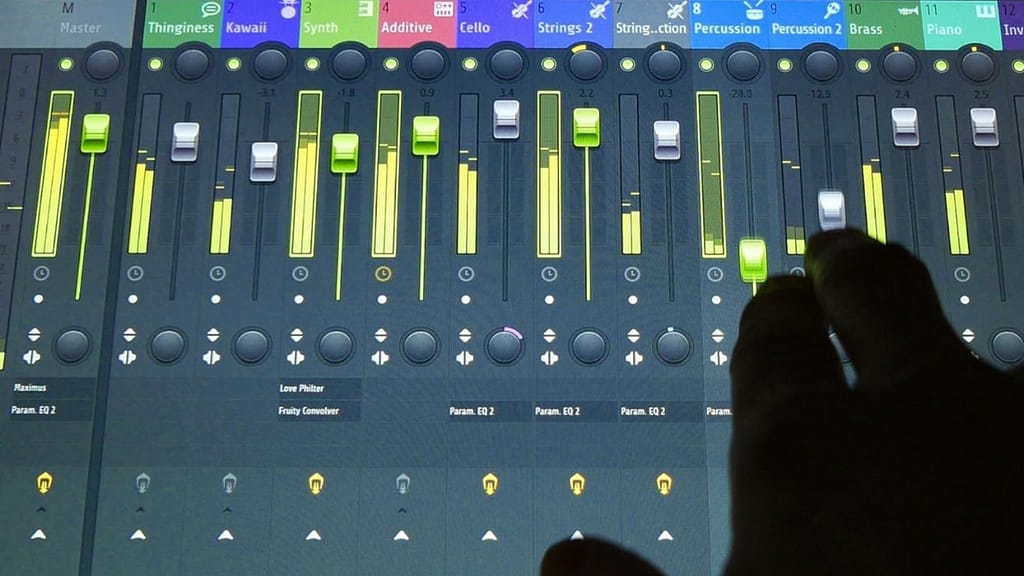
FL Studio Mobile is the portable version of the popular desktop software, FL Studio. It’s available on both iOS and Android devices, offering a range of tools for music creation. This app is known for its high-quality sound and flexibility, allowing users to create and edit tracks on the go.
Key Features:
- Step sequencer for percussion programming, enabling precise control over rhythm and beats.
- Piano roll for note editing, which is invaluable for composing melodies and harmonies.
- Mixer for effects and EQ, providing tools to fine-tune the sound of each track.
- Supports MIDI controllers, allowing you to connect hardware instruments and enhance your music production experience.
FL Studio Mobile also offers the capability to export your projects to the desktop version of FL Studio, providing a seamless transition if you decide to invest in more advanced production tools. Its customizable interface allows you to tailor the app to your workflow, making it a versatile option for beginners and experienced producers alike.
3. BandLab
BandLab is a free music production app that offers unlimited cloud storage, making it easy to collaborate with other musicians. It’s available on iOS, Android, and web platforms, providing a seamless experience across devices. BandLab is perfect for beginners due to its straightforward interface and community features, which allow users to share their music and get feedback.
Key Features:
- 12 track mix editor, offering ample space for layering instruments and vocals in your compositions.
- Over 100 virtual instruments, covering a wide range of sounds and styles.
- Social features for collaboration, including the ability to collaborate in real-time with musicians around the world.
- Built-in mastering tools to polish your tracks before sharing them with others.
BandLab’s community aspect is particularly beneficial for beginners, as it offers a platform to connect with other musicians, exchange ideas, and receive constructive feedback. The app also hosts regular contests and challenges, providing additional motivation and opportunities for exposure as you develop your skills.
4. Soundtrap
Soundtrap is another excellent choice for beginners, offering a collaborative environment where users can create music together online. It’s a web-based DAW, which means you can access it from any device with an internet connection. Soundtrap is user-friendly and provides a wide range of instruments and loops to experiment with.
Key Features:
- Real-time collaboration with other users, allowing you to invite friends to join your project and create music together.
- Large library of loops and presets, giving you the tools to start producing music right away.
- Auto-tune feature, perfect for vocalists who want to enhance their recordings.
- Podcast creation tools, making it a versatile app for those interested in both music and audio storytelling.
Soundtrap also offers education plans and resources for teachers and students, making it an excellent choice for music educators looking to introduce their students to music production. Its cross-platform compatibility ensures that everyone can join the creative process, regardless of their device.
5. Caustic 3
Caustic 3 is a fun and intuitive app that mimics the operation of rack-mount synthesizers and samplers. It’s available on iOS and Android devices and is perfect for those interested in electronic music production. With its extensive range of synthesizers and effects, Caustic 3 offers a playground for creativity.
Key Features:
- 14 synthesizers, including Subsynth, PCMSynth, and BassLine, each offering unique sound design possibilities.
- Pattern-based sequencer, perfect for creating complex rhythmic patterns and melodies.
- Real-time effects rack, allowing you to add and manipulate effects as your track plays.
- Automation support, giving you the ability to dynamically control parameters over time.
Caustic 3’s modular approach lets users build their own custom sound setups, making it an excellent choice for those who enjoy experimenting with sound design. The app’s community forums provide additional support and inspiration, helping you to troubleshoot and enhance your music production techniques.
Tips for Getting Started with Music Production Apps
- Explore Tutorials: Most apps offer tutorials or guides to help you get started. Take advantage of these resources to understand the basics. Many apps also have active user communities and forums where you can find additional tips and tricks.
- Experiment with Sounds: Don’t be afraid to try different sounds and effects to find your unique style. Explore the variety of instruments and loops available, and don’t hesitate to mix genres to create something truly original.
- Collaborate with Others: Use apps with social features to connect with other musicians and learn from their experiences. Collaboration can provide new perspectives and inspire creativity, helping you grow as a musician.
- Practice Regularly: Like any skill, regular practice is key to improving your music production abilities. Set aside dedicated time each week to work on your music, and don’t be discouraged by initial setbacks. Consistency is crucial for progress.
- Set Goals: Establish short-term and long-term goals for your music production journey. Whether it’s completing a track, learning a new technique, or collaborating with another artist, having clear objectives will keep you motivated and focused.
Conclusion
Music production apps are a fantastic way for beginners to start creating music. With user-friendly interfaces and a variety of features, these apps make it easy to explore your musical talents. Whether you choose GarageBand for its simplicity or FL Studio Mobile for its advanced features, the most important thing is to start creating and have fun with your music journey.
By selecting the right music production app and dedicating time to practice, you’ll be well on your way to producing your first track. Remember, the journey of music production is as much about exploration and creativity as it is about technical skill. Embrace the process, learn from each experience, and most importantly, enjoy the music-making journey. Happy music-making!

Leave a Reply